slint
import { StandardListView, VerticalBox } from "std-widgets.slint";export component Example inherits Window {    width: 200px;    height: 200px;
    VerticalBox {        StandardListView {            model: [ { text: "Blue"}, { text: "Red" }, { text: "Green" },                { text: "Yellow" }, { text: "Black"}, { text: "White"},                { text: "Magenta" }, { text: "Cyan" },            ];        }    }}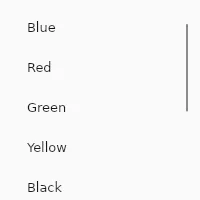
类似于 ListView,但带有默认委托和 model 属性。
属性
与 ListView 相同,并附加:
current-item
int (in-out) default: 0
当前活动项的索引。-1 表示未选中任何项,这是默认值。
model
struct StandardListViewItem default: a struct with all default values
模型。
slint
StandardListView { model: [{ text: "Blue" }, { text: "Red" }, { text: "Green" }];}StandardListViewItem
表示 StandardListView 和 StandardTableView 中的一项。
text(string):该项的文本内容
函数
set-current-item(int)
通过指定的索引设置当前项,并将其滚动到视图中。
回调
current-item-changed(int)
当用户修改导致当前项发生变化时触发。
slint
StandardListView { model: [{ text: "Blue" }, { text: "Red" }, { text: "Green" }]; current-item-changed(index) => { debug("Current item: ", index); }}item-pointer-event(int, PointerEvent, Point)
在任何鼠标指针事件上触发,类似于 TouchArea。参数为与该事件关联的项索引、PointerEvent 本身以及 listview 中的鼠标位置。