slint
import { StandardButton, Button } from "std-widgets.slint";export component Example inherits Dialog { Text { text: "This is a dialog box"; } StandardButton { kind: ok; } StandardButton { kind: cancel; } Button { text: "More Info"; dialog-button-role: action; }}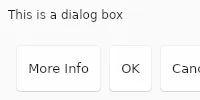
Dialog 可用于代替 Window,但它具有自动布局的按钮。
Dialog 应有一个作为子元素的主元素,该主元素不是按钮。 该对话框可以具有任意数量的 StandardButton控件或具有 dialog-button-role属性的其他按钮。 按钮将按照运行时依赖于目标平台的顺序放置。
StandardButton 的 kind 属性和 dialog-button-role 属性需要设置为常量值,它不能是任意的变量表达式。 不能有多个同种 StandardButton。
对于每个没有显式回调处理程序的 StandardButton,会自动添加一个 <kind>_clicked回调,以便可以从原生代码处理:例如,如果有一个 kind 为 cancel 的按钮,则会添加一个 cancel_clicked回调。 每个这些自动生成的回调都是关联的 StandardButton 的 clicked回调的别名。
##属性
与 Window相同。
##函数
与 Window相同。